
Tổng hợp kiến thức cơ bản về Java IO
Giới thiệu về IO stream
IO là viết tắt của Input/Output, nghĩa là input và output. Quá trình đưa dữ liệu vào memory của máy tính là input; ngược lại, quá trình đưa dữ liệu ra external storage (chẳng hạn database, file, remote host) là output. Quá trình truyền dữ liệu tương tự dòng nước, vì vậy được gọi là IO stream. Trong Java, IO stream được chia thành input stream và output stream; dựa theo cách xử lý dữ liệu, chúng lại được chia thành byte stream và character stream.
Hơn 40 class của Java IO đều được phát sinh từ 4 abstract class cơ sở sau.
InputStream/Reader: base class của mọi input stream; class đầu là byte input stream, class sau là character input stream.OutputStream/Writer: base class của mọi output stream; class đầu là byte output stream, class sau là character output stream.
Byte stream
InputStream (byte input stream)
InputStream dùng để đọc dữ liệu (thông tin dạng byte) từ source (thường là file) vào memory; abstract class java.io.InputStream là parent class của mọi byte input stream.
Các method thường dùng của InputStream:
read(): trả về dữ liệu của byte tiếp theo trong input stream. Giá trị nằm trong khoảng từ 0 đến 255. Nếu không đọc được byte nào, method trả về-1, biểu thị end of file.read(byte b[ ]): đọc một số byte từ input stream và lưu vào arrayb. Nếu độ dài arraybbằng 0 thì không đọc. Nếu không có byte khả dụng để đọc thì trả về-1. Nếu có byte khả dụng thì đọc nhiều nhấtb.lengthbyte và trả về số byte đã đọc. Method này tương đươngread(b, 0, b.length).read(byte b[], int off, int len): bổ sung tham sốoff(offset) và tham sốlen(số byte tối đa cần đọc) trên cơ sở methodread(byte b[ ]).skip(long n): bỏ qua n byte của input stream, trả về số byte thực tế đã bỏ qua.available(): trả về giá trị ước lượng số byte có thể đọc (hoặc bỏ qua) mà không blocking; không thể dùng nó để xác định tổng độ dài của input stream.close(): đóng input stream và giải phóng các system resource liên quan.
Từ Java 9, InputStream bổ sung một số method hữu ích:
readAllBytes(): đọc tất cả byte trong input stream và trả về byte array.readNBytes(byte[] b, int off, int len): cố gắng đọc nhiều nhấtlenbyte, trả về khi đọc đủ độ dài chỉ định hoặc gặp cuối stream; trong quá trình đọc có thể bị blocking hoặc ném exception.transferTo(OutputStream out): truyền toàn bộ byte từ một input stream sang một output stream.
FileInputStream là một byte input stream object khá thường dùng, có thể chỉ định trực tiếp file path, đọc trực tiếp một byte hoặc đọc vào byte array.
Ví dụ code của FileInputStream:
try (InputStream fis = new FileInputStream("input.txt")) {
    System.out.println("Number of remaining bytes:"
            + fis.available());
    int content;
    long skip = fis.skip(2);
    System.out.println("The actual number of bytes skipped:" + skip);
    System.out.print("The content read from file:");
    while ((content = fis.read()) != -1) {
        System.out.print((char) content);
    }
} catch (IOException e) {
    e.printStackTrace();
}
Nội dung file input.txt:
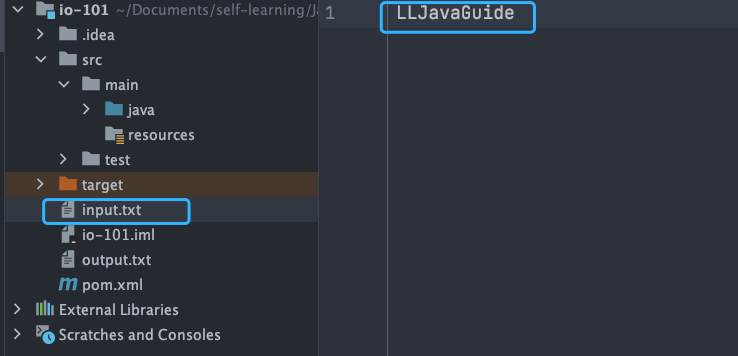
Output:
Number of remaining bytes:11
The actual number of bytes skipped:2
The content read from file:JavaGuide
Tuy nhiên, thông thường FileInputStream không được dùng riêng mà được kết hợp với BufferedInputStream (byte buffered input stream, sẽ trình bày ở phần sau).
Đoạn code dưới đây khá thường gặp trong project: dùng readAllBytes() để đọc toàn bộ byte của input stream rồi gán trực tiếp cho object String.
// Tạo một object BufferedInputStream
BufferedInputStream bufferedInputStream = new BufferedInputStream(new FileInputStream("input.txt"));
// Đọc nội dung file và sao chép vào object String
String result = new String(bufferedInputStream.readAllBytes());
System.out.println(result);
DataInputStream dùng để đọc dữ liệu thuộc type chỉ định, không thể sử dụng độc lập mà phải kết hợp với stream khác, chẳng hạn FileInputStream.
FileInputStream fileInputStream = new FileInputStream("input.txt");
// Phải dùng fileInputStream làm tham số constructor mới có thể sử dụng
DataInputStream dataInputStream = new DataInputStream(fileInputStream);
// Có thể đọc dữ liệu của mọi type cụ thể
dataInputStream.readBoolean();
dataInputStream.readInt();
dataInputStream.readUTF();
ObjectInputStream dùng để đọc Java object từ input stream (deserialization), còn ObjectOutputStream dùng để ghi object vào output stream (serialization).
ObjectInputStream input = new ObjectInputStream(new FileInputStream("object.data"));
MyClass object = (MyClass) input.readObject();
input.close();
Ngoài ra, class dùng cho serialization và deserialization phải implement interface Serializable. Nếu object có property không muốn serialize, dùng modifier transient.
OutputStream (byte output stream)
OutputStream dùng để ghi dữ liệu (thông tin dạng byte) vào destination (thường là file); abstract class java.io.OutputStream là parent class của mọi byte output stream.
Các method thường dùng của OutputStream:
write(int b): ghi byte cụ thể vào output stream.write(byte b[ ]): ghi arraybvào output stream, tương đươngwrite(b, 0, b.length).write(byte[] b, int off, int len): bổ sung tham sốoff(offset) và tham sốlen(số byte tối đa cần ghi) trên cơ sởwrite(byte b[ ]).flush(): flush output stream và buộc ghi ra toàn bộ byte output đang buffered.close(): đóng output stream và giải phóng các system resource liên quan.
FileOutputStream là byte output stream object được dùng phổ biến nhất, có thể chỉ định trực tiếp file path, ghi trực tiếp một byte hoặc byte array chỉ định.
Ví dụ code của FileOutputStream:
try (FileOutputStream output = new FileOutputStream("output.txt")) {
    byte[] array = "JavaGuide".getBytes();
    output.write(array);
} catch (IOException e) {
    e.printStackTrace();
}
Kết quả chạy:
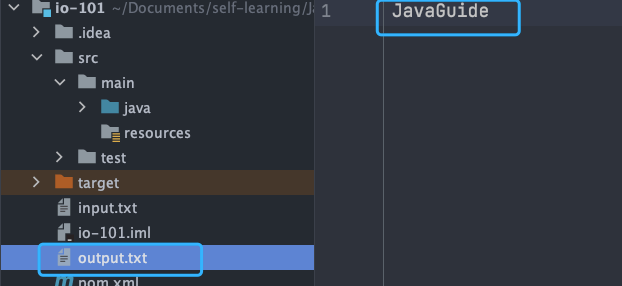
Tương tự FileInputStream, FileOutputStream thường được dùng kết hợp với BufferedOutputStream (byte buffered output stream, sẽ trình bày ở phần sau).
FileOutputStream fileOutputStream = new FileOutputStream("output.txt");
BufferedOutputStream bos = new BufferedOutputStream(fileOutputStream);
DataOutputStream dùng để ghi dữ liệu thuộc type chỉ định, không thể sử dụng độc lập mà phải kết hợp với stream khác, chẳng hạn FileOutputStream.
// Output stream
FileOutputStream fileOutputStream = new FileOutputStream("out.txt");
DataOutputStream dataOutputStream = new DataOutputStream(fileOutputStream);
// Output dữ liệu của mọi type
dataOutputStream.writeBoolean(true);
dataOutputStream.writeByte(1);
ObjectInputStream dùng để đọc Java object từ input stream (deserialization), còn ObjectOutputStream dùng để ghi object vào output stream (serialization).
ObjectOutputStream output = new ObjectOutputStream(new FileOutputStream("file.txt"));
Person person = new Person("Guide", "JavaGuide author");
output.writeObject(person);
Character stream
Dù là đọc ghi file hay gửi nhận qua network, đơn vị lưu trữ nhỏ nhất của thông tin đều là byte. Vậy tại sao thao tác I/O stream lại được chia thành byte stream và character stream?
Theo tôi, chủ yếu có hai nguyên nhân:
- Character stream được Java Virtual Machine chuyển đổi từ byte, quá trình này tương đối tốn thời gian.
- Nếu không biết encoding thì rất dễ xuất hiện mojibake.
Mojibake rất dễ tái hiện: chỉ cần đổi nội dung file input.txt trong ví dụ code FileInputStream ở trên thành tiếng Trung, không cần sửa code gốc.
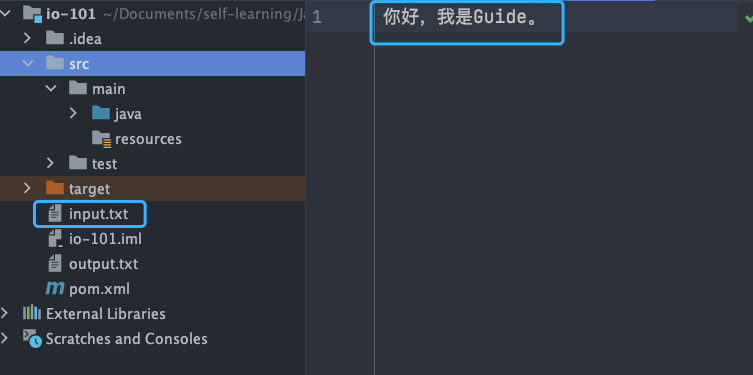
Output:
Number of remaining bytes:9
The actual number of bytes skipped:2
The content read from file:§å®¶å¥½
Có thể thấy rõ nội dung đọc được đã trở thành mojibake.
Vì vậy, I/O stream cung cấp một interface thao tác trực tiếp với character, thuận tiện cho việc xử lý character bằng stream. Với media file như audio file và image, byte stream phù hợp hơn; nếu liên quan đến character, character stream phù hợp hơn.
Reader và Writer dùng để thao tác với character; khi chuyển đổi giữa byte stream và character stream, cần chỉ định encoding thông qua Charset. Các class chuyển đổi không chỉ định encoding tường minh sẽ dùng charset mặc định của JVM.
Unicode bản thân chỉ là một character set, gán một số duy nhất cho mỗi character nhưng không quy định cách lưu trữ cụ thể. UTF-8, UTF-16 và UTF-32 đều là encoding method của Unicode, dùng số byte khác nhau để biểu diễn Unicode character. Ví dụ, UTF-8: tiếng Anh dùng 1 byte, tiếng Trung dùng 3 byte.
Reader (character input stream)
Reader dùng để đọc dữ liệu (thông tin dạng character) từ source (thường là file) vào memory; abstract class java.io.Reader là parent class của mọi character input stream.
Reader dùng để đọc text, còn InputStream dùng để đọc raw byte.
Các method thường dùng của Reader:
read(): đọc một character từ input stream.read(char[] cbuf): đọc một số character từ input stream và lưu chúng vào character arraycbuf, tương đươngread(cbuf, 0, cbuf.length).read(char[] cbuf, int off, int len): bổ sung tham sốoff(offset) và tham sốlen(số character tối đa cần đọc) trên cơ sởread(char[] cbuf).skip(long n): bỏ qua n character của input stream, trả về số character thực tế đã bỏ qua.close(): đóng input stream và giải phóng các system resource liên quan.
InputStreamReader là bridge chuyển byte stream thành character stream; subclass FileReader là wrapper dựa trên class này, có thể thao tác trực tiếp với file văn bản.
// Bridge chuyển byte stream thành character stream
public class InputStreamReader extends Reader {
}
// Dùng để đọc file văn bản
public class FileReader extends InputStreamReader {
}
Ví dụ code của FileReader:
try (FileReader fileReader = new FileReader("input.txt");) {
    int content;
    long skip = fileReader.skip(3);
    System.out.println("The actual number of characters skipped:" + skip);
    System.out.print("The content read from file:");
    while ((content = fileReader.read()) != -1) {
        System.out.print((char) content);
    }
} catch (IOException e) {
    e.printStackTrace();
}
Nội dung file input.txt:
Output:
The actual number of characters skipped:3
The content read from file:I am Guide.
Writer (character output stream)
Writer dùng để ghi dữ liệu (thông tin dạng character) vào destination (thường là file); abstract class java.io.Writer là parent class của mọi character output stream.
Các method thường dùng của Writer:
write(int c): ghi một character.write(char[] cbuf): ghi character arraycbuf, tương đươngwrite(cbuf, 0, cbuf.length).write(char[] cbuf, int off, int len): bổ sung tham sốoff(offset) và tham sốlen(số character tối đa cần ghi) trên cơ sởwrite(char[] cbuf).write(String str): ghi string, tương đươngwrite(str, 0, str.length()).write(String str, int off, int len): bổ sung tham sốoff(offset) và tham sốlen(số character tối đa cần ghi) trên cơ sởwrite(String str).append(CharSequence csq): append character sequence chỉ định vàoWriterchỉ định và trả vềWriterđó.append(char c): append character chỉ định vàoWriterchỉ định và trả vềWriterđó.flush(): flush output stream và buộc ghi ra toàn bộ character output đang buffered.close(): đóng output stream và giải phóng các system resource liên quan.
OutputStreamWriter là bridge chuyển character stream thành byte stream; subclass FileWriter là wrapper dựa trên class này, có thể ghi character trực tiếp vào file.
// Bridge chuyển character stream thành byte stream
public class OutputStreamWriter extends Writer {
}
// Dùng để ghi character vào file
public class FileWriter extends OutputStreamWriter {
}
Ví dụ code của FileWriter:
try (Writer output = new FileWriter("output.txt")) {
    output.write("Hello, I am Guide.");
} catch (IOException e) {
    e.printStackTrace();
}
Kết quả output:

Byte buffered stream
Thao tác IO rất tốn performance. Buffered stream nạp dữ liệu vào buffer, đọc/ghi nhiều byte trong một lần, từ đó tránh thao tác IO thường xuyên và nâng cao throughput của stream.
Byte buffered stream sử dụng decorator pattern để bổ sung chức năng cho các subclass InputStream và OutputStream.
Ví dụ, có thể dùng BufferedInputStream (byte buffered input stream) để bổ sung chức năng cho FileInputStream.
// Tạo một object BufferedInputStream
BufferedInputStream bufferedInputStream = new BufferedInputStream(new FileInputStream("input.txt"));
Chênh lệch performance giữa byte stream và byte buffered stream chủ yếu thể hiện khi sử dụng cả hai với hai method mỗi lần chỉ xử lý một byte là write(int b) và read(). Vì byte buffered stream có buffer (byte array) bên trong, nó trước hết lưu byte đã đọc vào buffer, giảm đáng kể số lần IO và nâng cao hiệu suất đọc.
Tôi dùng các method write(int b) và read() để copy một PDF file 524.9 mb, lần lượt qua byte stream và byte buffered stream; thời gian tiêu tốn như sau:
Tổng thời gian copy PDF file bằng buffered stream:15428 milliseconds
Tổng thời gian copy PDF file bằng byte stream thông thường:2555062 milliseconds
Chênh lệch thời gian của hai bên rất lớn; thời gian của buffered stream chỉ bằng 1/165 thời gian của byte stream.
Code test như sau:
@Test
void copy_pdf_to_another_pdf_buffer_stream() {
    // Ghi nhận thời điểm bắt đầu
    long start = System.currentTimeMillis();
    try (BufferedInputStream bis = new BufferedInputStream(new FileInputStream("Understanding Computer Systems.pdf"));
         BufferedOutputStream bos = new BufferedOutputStream(new FileOutputStream("Understanding Computer Systems-copy.pdf"))) {
        int content;
        while ((content = bis.read()) != -1) {
            bos.write(content);
        }
    } catch (IOException e) {
        e.printStackTrace();
    }
    // Ghi nhận thời điểm kết thúc
    long end = System.currentTimeMillis();
    System.out.println("Tổng thời gian copy PDF file bằng buffered stream:" + (end - start) + " milliseconds");
}

@Test
void copy_pdf_to_another_pdf_stream() {
    // Ghi nhận thời điểm bắt đầu
    long start = System.currentTimeMillis();
    try (FileInputStream fis = new FileInputStream("Understanding Computer Systems.pdf");
         FileOutputStream fos = new FileOutputStream("Understanding Computer Systems-copy.pdf")) {
        int content;
        while ((content = fis.read()) != -1) {
            fos.write(content);
        }
    } catch (IOException e) {
        e.printStackTrace();
    }
    // Ghi nhận thời điểm kết thúc
    long end = System.currentTimeMillis();
    System.out.println("Tổng thời gian copy PDF file bằng stream thông thường:" + (end - start) + " milliseconds");
}
Nếu dùng hai method làm việc với byte array là read(byte b[]) và write(byte b[], int off, int len), chỉ cần kích thước byte array phù hợp thì chênh lệch performance giữa hai bên thực ra không lớn, về cơ bản có thể bỏ qua.
Lần này chúng ta dùng các method read(byte b[]) và write(byte b[], int off, int len), lần lượt qua byte stream và byte buffered stream để copy một PDF file 524.9 mb; thời gian tiêu tốn như sau:
Tổng thời gian copy PDF file bằng buffered stream:695 milliseconds
Tổng thời gian copy PDF file bằng byte stream thông thường:989 milliseconds
Chênh lệch thời gian của hai bên không lớn; performance của buffered stream chỉ tốt hơn một chút.
Code test như sau:
@Test
void copy_pdf_to_another_pdf_with_byte_array_buffer_stream() {
    // Ghi nhận thời điểm bắt đầu
    long start = System.currentTimeMillis();
    try (BufferedInputStream bis = new BufferedInputStream(new FileInputStream("Understanding Computer Systems.pdf"));
         BufferedOutputStream bos = new BufferedOutputStream(new FileOutputStream("Understanding Computer Systems-copy.pdf"))) {
        int len;
        byte[] bytes = new byte[4 * 1024];
        while ((len = bis.read(bytes)) != -1) {
            bos.write(bytes, 0, len);
        }
    } catch (IOException e) {
        e.printStackTrace();
    }
    // Ghi nhận thời điểm kết thúc
    long end = System.currentTimeMillis();
    System.out.println("Tổng thời gian copy PDF file bằng buffered stream:" + (end - start) + " milliseconds");
}

@Test
void copy_pdf_to_another_pdf_with_byte_array_stream() {
    // Ghi nhận thời điểm bắt đầu
    long start = System.currentTimeMillis();
    try (FileInputStream fis = new FileInputStream("Understanding Computer Systems.pdf");
         FileOutputStream fos = new FileOutputStream("Understanding Computer Systems-copy.pdf")) {
        int len;
        byte[] bytes = new byte[4 * 1024];
        while ((len = fis.read(bytes)) != -1) {
            fos.write(bytes, 0, len);
        }
    } catch (IOException e) {
        e.printStackTrace();
    }
    // Ghi nhận thời điểm kết thúc
    long end = System.currentTimeMillis();
    System.out.println("Tổng thời gian copy PDF file bằng stream thông thường:" + (end - start) + " milliseconds");
}
BufferedInputStream (byte buffered input stream)
Trong quá trình BufferedInputStream đọc dữ liệu (thông tin dạng byte) từ source (thường là file) vào memory, nó không đọc từng byte một mà trước hết lưu byte đã đọc vào buffer, rồi đọc riêng từng byte từ internal buffer. Nhờ đó giảm đáng kể số lần IO và nâng cao hiệu suất đọc.
BufferedInputStream duy trì một buffer bên trong; buffer này thực chất là một byte array. Có thể rút ra kết luận này khi đọc source code của BufferedInputStream.
public
class BufferedInputStream extends FilterInputStream {
    // Array làm internal buffer
    protected volatile byte buf[];
    // Kích thước mặc định của buffer
    private static int DEFAULT_BUFFER_SIZE = 8192;
    // Dùng kích thước buffer mặc định
    public BufferedInputStream(InputStream in) {
        this(in, DEFAULT_BUFFER_SIZE);
    }
    // Tùy chỉnh kích thước buffer
    public BufferedInputStream(InputStream in, int size) {
        super(in);
        if (size <= 0) {
            throw new IllegalArgumentException("Buffer size <= 0");
        }
        buf = new byte[size];
    }
}
Kích thước buffer mặc định là 8192 byte. Dĩ nhiên, có thể dùng constructor BufferedInputStream(InputStream in, int size) để chỉ định kích thước buffer.
BufferedOutputStream (byte buffered output stream)
Trong quá trình BufferedOutputStream ghi dữ liệu (thông tin dạng byte) vào destination (thường là file), nó không ghi từng byte một mà trước hết lưu byte cần ghi vào buffer, rồi ghi dữ liệu từ internal buffer. Nhờ đó giảm đáng kể số lần IO và nâng cao hiệu suất.
try (BufferedOutputStream bos = new BufferedOutputStream(new FileOutputStream("output.txt"))) {
    byte[] array = "JavaGuide".getBytes();
    bos.write(array);
} catch (IOException e) {
    e.printStackTrace();
}
Tương tự BufferedInputStream, bên trong BufferedOutputStream cũng duy trì một buffer, và kích thước buffer này cũng là 8192 byte.
Character buffered stream
BufferedReader (character buffered input stream) và BufferedWriter (character buffered output stream) tương tự BufferedInputStream (byte buffered input stream) và BufferedOutputStream (byte buffered output stream), nhưng hai class này duy trì character buffer bên trong để thao tác với thông tin dạng character.
Print stream
Bạn thường sử dụng đoạn code dưới đây phải không?
System.out.print("Hello!");
System.out.println("Hello!");
System.out thực chất là một object PrintStream; method print thực tế gọi method write của object PrintStream.
PrintStream là byte print stream, class tương ứng là PrintWriter (character print stream). PrintStream là subclass của OutputStream, còn PrintWriter là subclass của Writer.
public class PrintStream extends FilterOutputStream
    implements Appendable, Closeable {
}
public class PrintWriter extends Writer {
}
Random access stream
Random access stream được giới thiệu ở đây là RandomAccessFile, hỗ trợ nhảy tùy ý đến mọi vị trí trong file để đọc và ghi.
Constructor của RandomAccessFile như sau; có thể chỉ định mode (read/write mode).
// Tham số openAndDelete mặc định là false, biểu thị mở file nhưng không xóa file
public RandomAccessFile(File file, String mode)
    throws FileNotFoundException {
    this(file, mode, false);
}
// Private method
private RandomAccessFile(File file, String mode, boolean openAndDelete)  throws FileNotFoundException{
  // Bỏ qua phần lớn code
}
Có bốn read/write mode chính:
r: read-only mode.rw: read/write mode.rws: so vớirw,rwsđồng bộ các thay đổi đối với "file content" hoặc "metadata" với external storage device.rwd: so vớirw,rwdđồng bộ các thay đổi đối với "file content" với external storage device.
Nội dung file là dữ liệu thực tế được lưu trong file; metadata dùng để mô tả thuộc tính file, chẳng hạn kích thước, thời điểm tạo và sửa đổi.
Trong RandomAccessFile có một file pointer biểu thị vị trí của byte tiếp theo sẽ được ghi hoặc đọc. Có thể dùng method seek(long pos) của RandomAccessFile để đặt offset của file pointer (vị trí cách đầu file pos byte). Nếu muốn lấy vị trí hiện tại của file pointer, có thể dùng method getFilePointer().
Ví dụ code của RandomAccessFile:
RandomAccessFile randomAccessFile = new RandomAccessFile(new File("input.txt"), "rw");
System.out.println("Offset trước khi đọc: " + randomAccessFile.getFilePointer() + ", character đọc được hiện tại: " + (char) randomAccessFile.read() + ", offset sau khi đọc: " + randomAccessFile.getFilePointer());
// Offset hiện tại của pointer là 6
randomAccessFile.seek(6);
System.out.println("Offset trước khi đọc: " + randomAccessFile.getFilePointer() + ", character đọc được hiện tại: " + (char) randomAccessFile.read() + ", offset sau khi đọc: " + randomAccessFile.getFilePointer());
// Bắt đầu ghi byte data từ vị trí offset 7
randomAccessFile.write(new byte[]{'H', 'I', 'J', 'K'});
// Offset hiện tại của pointer là 0, quay lại vị trí bắt đầu
randomAccessFile.seek(0);
System.out.println("Offset trước khi đọc: " + randomAccessFile.getFilePointer() + ", character đọc được hiện tại: " + (char) randomAccessFile.read() + ", offset sau khi đọc: " + randomAccessFile.getFilePointer());
Nội dung file input.txt:
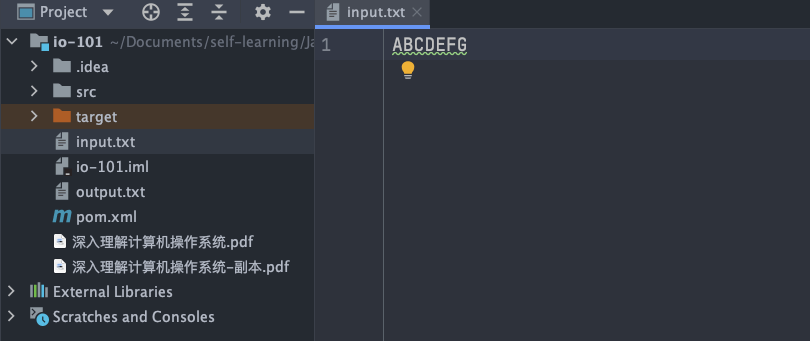
Output:
Offset trước khi đọc: 0, character đọc được hiện tại: A, offset sau khi đọc: 1
Offset trước khi đọc: 6, character đọc được hiện tại: G, offset sau khi đọc: 7
Offset trước khi đọc: 0, character đọc được hiện tại: A, offset sau khi đọc: 1
Nội dung input.txt trở thành ABCDEFGHIJK.
Method write của RandomAccessFile sẽ overwrite dữ liệu tại vị trí tương ứng nếu vị trí đó đã có data.
RandomAccessFile randomAccessFile = new RandomAccessFile(new File("input.txt"), "rw");
randomAccessFile.write(new byte[]{'H', 'I', 'J', 'K'});
Giả sử trước khi chạy chương trình trên, nội dung file input.txt là ABCD; sau khi chạy, nội dung sẽ trở thành HIJK.
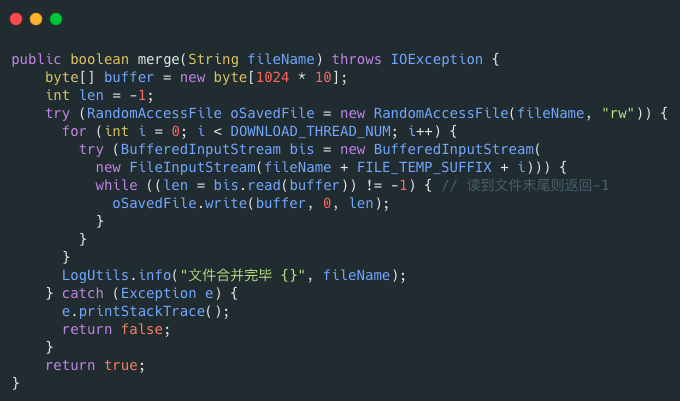
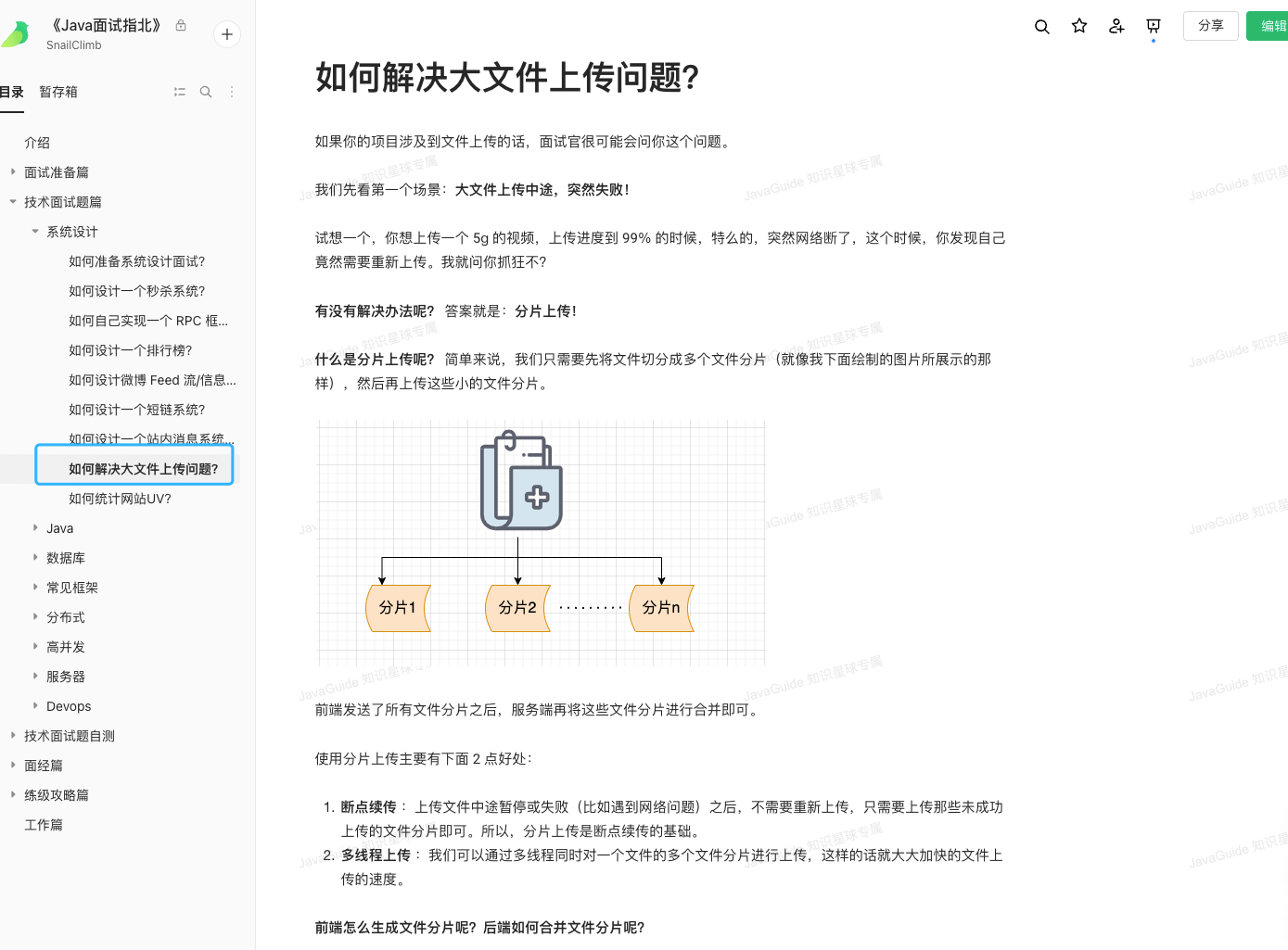
Một application khá phổ biến của RandomAccessFile là implement resumable upload cho file lớn. Resumable upload là gì? Nói đơn giản, sau khi upload file bị pause hoặc fail giữa chừng (chẳng hạn gặp vấn đề network), không cần upload lại từ đầu mà chỉ cần upload các chunk chưa upload thành công. Upload theo chunk (trước hết chia file thành nhiều chunk) là nền tảng của resumable upload.
RandomAccessFile có thể giúp merge các file chunk; code ví dụ như sau:
Tôi đã giới thiệu chi tiết vấn đề upload file lớn trong 《Java Interview Guide》.
Implementation của RandomAccessFile phụ thuộc vào FileDescriptor (file descriptor) và FileChannel (file mapping).
Lời cuối
Nếu nội dung hữu ích với bạn, hãy tiện tay tặng JavaGuide một Star miễn phí để ủng hộ: GitHub | Gitee.
JavaGuide đã được duy trì gần bảy năm, tích lũy 6100+ commit, với sự chung tay hoàn thiện của 620+ contributor. Star, phản hồi và PR của bạn đều là động lực để dự án tiếp tục cập nhật.
Nếu bạn đang chuẩn bị phỏng vấn backend / phát triển ứng dụng AI, có thể tham khảo Knowledge Planet của tôi, bao gồm các project thực tế về backend và AI, tối ưu CV, hỏi đáp 1-1 và tài liệu về các trọng điểm thường gặp, đã được duy trì liên tục sáu năm.